Difference between revisions of "Systems biology - manual model construction"
From BioUML platform
(→Building from scratch) |
(→Building from scratch) |
||
| Line 1: | Line 1: | ||
==Building from scratch== | ==Building from scratch== | ||
| + | |||
<h3><b>Creation of a new diagram</b></h3> | <h3><b>Creation of a new diagram</b></h3> | ||
| + | <font size="3"> | ||
| + | The model development process is initiated by creation of the model network or diagram. A new diagram can be made in the <b>Work Space</b> by two methods: | ||
| + | <ol> | ||
| + | <li>via <b>Control Panel → New Diagram</b> (<b>Note</b>: please select the correct folder for a new diagram in your project area): | ||
| + | |||
| + | <br><br>[[File:Model_fromscratch_Fig1.png]]<br><br> | ||
| + | |||
| + | <li>via the <b>Tree Area</b> by a single click with the right mouse button on the corresponding folder of the project: | ||
| + | |||
| + | <br><br>[[File:Model_fromscratch_Fig2.png]]<br><br> | ||
| + | </ol> | ||
| + | |||
| + | The platform will ask you to select the diagram type and specify the diagram name you want to create in the work space. In the following, the creation of a new <b><i>“SBML model in SBGN notation”</i></b> will be described. | ||
| + | |||
| + | <br><br>[[File:Model_fromscratch_Fig3.png]]<br><br> | ||
| + | |||
| + | Upon selecting the type of a diagram and clicking <i>Ok</i> button a new node <b><i>New Diagram</i></b> will appear in the <b>Tree Area</b> and the corresponding tab is opened in the <b>Work Space</b> to start the diagram creation. | ||
| + | |||
| + | <br><br>[[File:Model_fromscratch_Fig3_1.png]]<br><br> | ||
| + | |||
| + | A pathway diagram opened in the work space has a tool bar as shown below: | ||
| + | |||
| + | <br><br>[[File:Model_fromscratch_Fig4.png]]<br><br> | ||
| + | </font size="3"> | ||
| + | |||
| + | <h3><b>Adding a new element to the diagram</b></h3> | ||
==Building from BioModels Repository== | ==Building from BioModels Repository== | ||
Revision as of 00:15, 16 March 2022
Contents |
Building from scratch
Creation of a new diagram
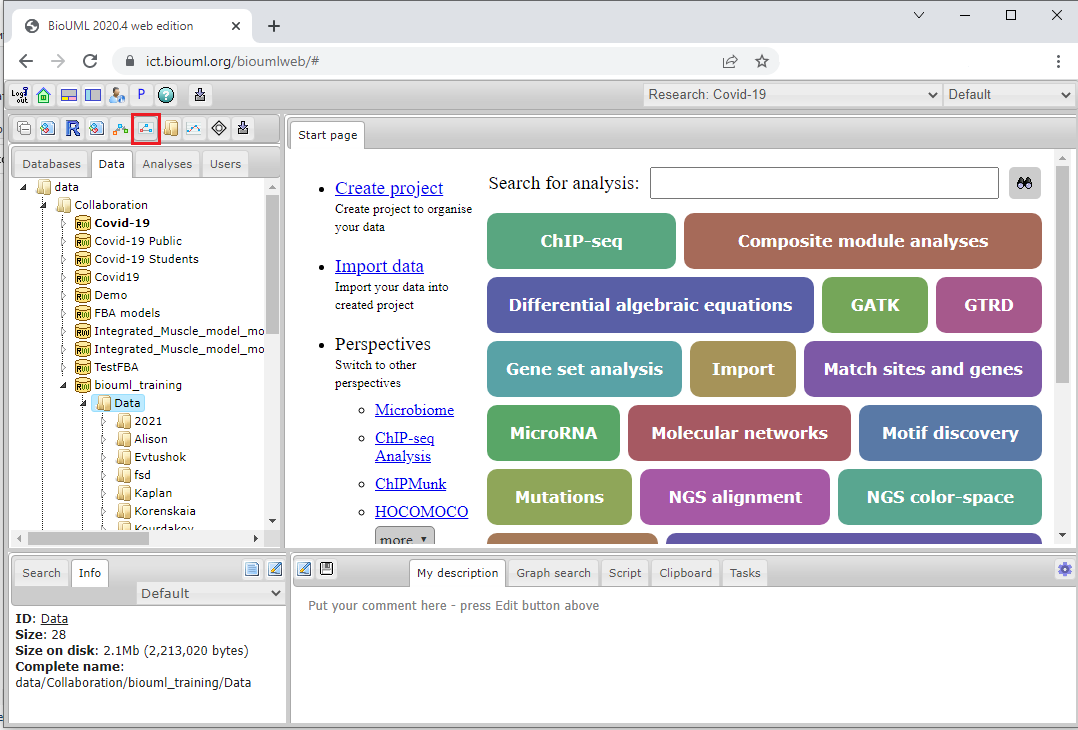
The model development process is initiated by creation of the model network or diagram. A new diagram can be made in the Work Space by two methods:
- via Control Panel → New Diagram (Note: please select the correct folder for a new diagram in your project area):
- via the Tree Area by a single click with the right mouse button on the corresponding folder of the project:
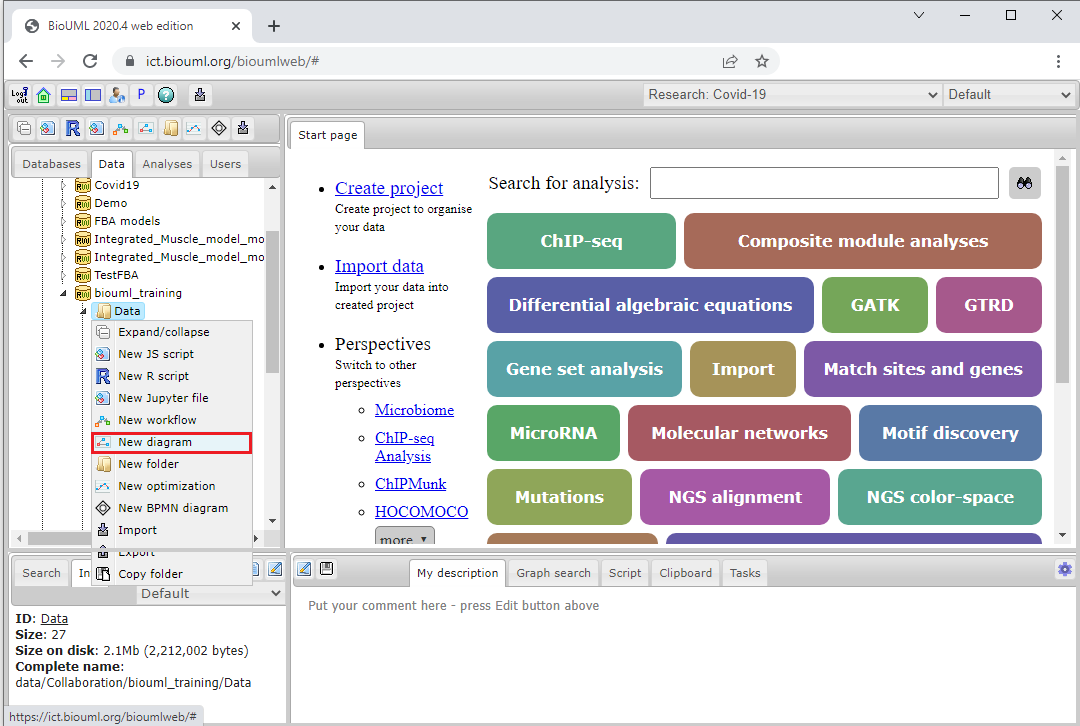


The platform will ask you to select the diagram type and specify the diagram name you want to create in the work space. In the following, the creation of a new “SBML model in SBGN notation” will be described.

Upon selecting the type of a diagram and clicking Ok button a new node New Diagram will appear in the Tree Area and the corresponding tab is opened in the Work Space to start the diagram creation.

A pathway diagram opened in the work space has a tool bar as shown below:

